Advanced JPEG Compressor 2012
Updated on 17 Feb 2012
By Anthony Buckner
By Anthony Buckner
Specifications
License:
Shareware (Free to try)
Updated:
Downloads:
3127
Platform:
Windows (All Versions)
Publisher:
WinSoftMagic(more)
Website:
User Reviews:
Other versions:
2011, 2009, 2008
Do you like
Advanced JPEG Compressor?
FindMySoft Editor's Review
Advanced JPEG Compressor – Reduce the size and keep the quality of image files
JPEG is the most popular image format out there. It is well balanced when it comes to quality and size. If you are not satisfied with any of JPEG's aspects, Advanced JPEG Compressor will help you with a big number of image processing features. From simple adjustments to advanced corrections or other options you would find in other editing software, you can do it all from a simple and easy to use interface.
Although it is an options rich editing program, it does not require too many resources. The setup kit is 1.72 Mb large, and it can be installed swiftly on any version of Windows.
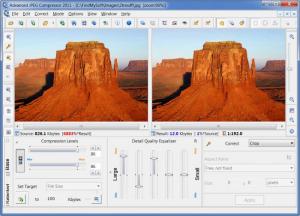
The user interface may look a bit overloaded, but the software lets you start editing your pictures right away. When editing a single image, its "before" and "after" statuses will be displayed on two separate preview areas which take up most of the main window. Most of the editing actions are organized in separate areas across the main window, so you can perform almost anything directly from the interface without needing to bring up new windows or navigate through complex menus.
Basic correction options, like adjusting the level of brightness, contrast, saturation and others, can be accessed separately from a drop menu. The adjustments themselves can be made by using the same slider, next to the drop menu. While doing this, you can see the effects of the settings on the "after" preview area, in real time. Another area of the interface contains options for adding a watermark. By making use of drop menus and sliders, you can add text or image, set the opacity level and the position of the watermark.
Prefiltering settings, like unsharping an image, removing noise, smoothing and others, are also available. You will find a slider for each of these adjustments placed neatly in one of the interface's areas. You can set Luma and Chroma compression levels, also by using sliders. Beneath these, a drop menu and a small dialog box will allow for setting a compression ratio or a size for the file you are working on. These offer good flexibility when compressing an image and trying to keep its quality.
Advanced JPEG Compressor features a built in batch editing tool which you can access by clicking its designated button on the toolbar. This will bring up a small window where you can target multiple pictures, add a prefix and suffix, if you want to, and select one of more compression profiles. These include converting them to e-mail photos, thumbnails, compressing them for pocket PCs and more. The formats of the images you can load can be GIF, TIFF, PNG or BMP, so you can also use the software as a converter.
Pros:
There is a lot to do when editing images with this software. Almost every setting can be made directly from the interface via sliders, check boxes or drop menus.
Cons:
The interface is a bit overloaded with buttons and the help file does not cover everything. Another drawback, concerning the trial version, is that you can't save any of your work.
The time you would normally spend while using an advanced image editing software can be reduced significantly. When it comes to compressing an image file or performing other basic editing tasks, Advanced JPEG Compressor lets you find the needed options a lot faster.
Although it is an options rich editing program, it does not require too many resources. The setup kit is 1.72 Mb large, and it can be installed swiftly on any version of Windows.
The user interface may look a bit overloaded, but the software lets you start editing your pictures right away. When editing a single image, its "before" and "after" statuses will be displayed on two separate preview areas which take up most of the main window. Most of the editing actions are organized in separate areas across the main window, so you can perform almost anything directly from the interface without needing to bring up new windows or navigate through complex menus.
Basic correction options, like adjusting the level of brightness, contrast, saturation and others, can be accessed separately from a drop menu. The adjustments themselves can be made by using the same slider, next to the drop menu. While doing this, you can see the effects of the settings on the "after" preview area, in real time. Another area of the interface contains options for adding a watermark. By making use of drop menus and sliders, you can add text or image, set the opacity level and the position of the watermark.
Prefiltering settings, like unsharping an image, removing noise, smoothing and others, are also available. You will find a slider for each of these adjustments placed neatly in one of the interface's areas. You can set Luma and Chroma compression levels, also by using sliders. Beneath these, a drop menu and a small dialog box will allow for setting a compression ratio or a size for the file you are working on. These offer good flexibility when compressing an image and trying to keep its quality.
Advanced JPEG Compressor features a built in batch editing tool which you can access by clicking its designated button on the toolbar. This will bring up a small window where you can target multiple pictures, add a prefix and suffix, if you want to, and select one of more compression profiles. These include converting them to e-mail photos, thumbnails, compressing them for pocket PCs and more. The formats of the images you can load can be GIF, TIFF, PNG or BMP, so you can also use the software as a converter.
Pros:
There is a lot to do when editing images with this software. Almost every setting can be made directly from the interface via sliders, check boxes or drop menus.
Cons:
The interface is a bit overloaded with buttons and the help file does not cover everything. Another drawback, concerning the trial version, is that you can't save any of your work.
The time you would normally spend while using an advanced image editing software can be reduced significantly. When it comes to compressing an image file or performing other basic editing tasks, Advanced JPEG Compressor lets you find the needed options a lot faster.
Do you like Advanced JPEG Compressor
Quick Look VideoNew
Popular News
Google announced that its deal to acquire Motorola Mobility has gone through. Motorola now officially belongs to Google.
This free tool from Anvisoft will fix and repair PC problems, giving your machine a speed boost.
Advanced JPEG Compressor Awards
Advanced JPEG Compressor Editor's Review Rating
Advanced JPEG Compressor has been reviewed by Frederick Barton on
17 Feb 2012. Based on the user interface, features and complexity, Findmysoft has rated
Advanced JPEG Compressor
4
out of 5 stars, naming it ExcellentYour Rating
Top Downloads
2.
Opera5.
Trillian8.
AIM9.
Skype10.
Ad-Aware12.
Nero13.
Google Earth14.
Picasa15.
Winamp16.
iTunes17.
RealPlayer18.
uTorrent19.
eMule20.
WinRAR21.
BitComet22.
WinZip23.
Shareaza24.
CCleaner25.
Recuva26.
Tweak UI27.
CuteFTP Home29.
Adobe Reader30.
NewsPiperBecome A Fan!
Link To Us!
Advanced JPEG Compressor
HTML Linking Code
HTML Linking Code
Latest Reviews